


Troubleshooting TLS Issues
Introduction
When configuring TLS for a GO-Global Application Host Manager—such as a Relay Load Balancer or Farm Manager—it’s essential that certificate settings are properly aligned across all connected hosts. The hostnames specified on Application Hosts must match the Common Name (CN), wildcard domain, or Subject Alternative Names (SAN) listed in the TLS certificate to ensure secure communication and successful registration in the Admin Console. This guide outlines key TLS configuration requirements, common connection errors, and troubleshooting steps for resolving certificate and trust issues.
Application Host Manager Considerations
When an Application Host Manager (i.e., Relay Load Balancer or Farm Manager) is configured to use TLS, the name entered into the Relay Load Balancer or Farm Manager field on the Application Hosts must match the Common Name, the wildcard domain, or one of the Subject Alternative Names (SAN) of the certificate. If they do not match, or if there is a problem with the certificate, the Application Hosts will fail to connect to the Application Host Manager, and they will not appear under the Application Host Manager in the Admin Console.
Note:
For information about using the TLS Protocol with Farms Hosts and Host Managers, see:
Troubleshooting TLS Issues Between Application Hosts and Application Host Managers
When an Application Host does not appear under underneath the Application Host Manager in the Admin Console’s tree view, check the Application Publishing Service log. If it contains a message that the certificate is invalid, there is a TLS configuration problem. Possible causes include:
- The name entered into the Relay Load Balancer or Farm Manager field on the Application Host does not match the Common Name, the wildcard domain, or one of the Subject Alternative Names (SAN) of the certificate.
- The certificate file on the Application Host Manager does not have one or more intermediate certificates concatenated.
- The certificate on the Application Host Manager is not in PEM format.
- The certificate on the Application Host Manager is not trusted by the Application Host (i.e., the root certificate in the certificate’s certificate chain is not included in the list of Trusted Root Certificates on the Application Host.
- The certificate is expired or system date is incorrect.
When troubleshooting issues like this, it is sometimes helpful to run AppController on the Application Host and try to connect to the Application Host Manager. This can be helpful because AppController provides additional information about TLS errors.
To do this:
Browse to the GO-Global\Programs directory on the Application Host and double-click AppController.exe.
Type the address of the Application Host Manager into the Connection dialog. Type the address exactly as it is specified in the Relay Load Balancer or Farm Manager field of the Host Options dialog on the Application Host.
Click Connect.
If a TLS warning message is displayed, the dialog will describe the problem. For example, if it says the certificate is from an organization that you have not chosen to trust, the problem is most likely that an intermediate certificate is not concatenated. Alternatively, it could mean that the certificate’s certificate chain is not included in the list of Trusted Root Certificates on the Application Host.
The message below illustrates three sequential warnings, as described above.
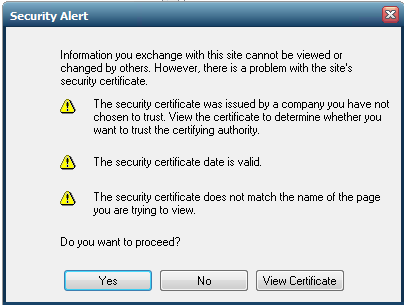
In this example, these issues were identified:
- The certificate on the Application Host Manager is not trusted by the Application Host (i.e., the root certificate in the certificate’s certificate chain is not included in the list of Trusted Root Certificates on the Application Host.
- The certificate is expired or system date is incorrect.
- The name entered into the Relay Load Balancer or Farm Manager field on the Application Host does not match the Common Name, the wildcard domain, or one of the Subject Alternative Names (SAN) of the certificate.
If no TLS warning dialog is displayed, but a different error message is displayed (e.g., No available hosts), the TLS configuration is likely not the issue. For the purposes of this test, you can disregard any error messages that do not pertain to the ability of the client to open a connection to the Application Host Manager.
Conclusion
Ensuring proper TLS configuration between Application Hosts and Application Host Managers is vital for maintaining secure, stable connections within a GO-Global environment. By verifying certificate accuracy, format, and trust settings, administrators can quickly identify and resolve connectivity issues. When in doubt, tools like AppController can provide detailed TLS diagnostics, helping pinpoint problems such as expired certificates or mismatched domains. With correct setup and verification, GO-Global environments remain both secure and reliable.
Are you an ISV exploring cloud-based application delivery? Contact us to learn how GO-Global can help you streamline software access for your end users. Or download a free trial to test it yourself.


