


Administering Relay Load Balancers and Dependent Hosts on Different Networks
Introduction
The GO-Global Relay Load Balancer provides a centralized way to manage and distribute user sessions across multiple Dependent Hosts. Acting as the core of a scalable remote access infrastructure, it balances session loads, synchronizes settings, and maintains security across networks—including those separated by firewalls or DMZs. This guide explains how the Relay Load Balancer works with Dependent Hosts, how to configure remote administration, and how to optimize session management for reliability and performance.
Body
When a user starts the Admin Console on a Relay Load Balancer or a Dependent Host, the Admin Console connects to the Relay Load Balancer and attempts to authenticate the user using Integrated Windows authentication. If the Admin Console is running on a Dependent Host and the associated Relay Load Balancer is located on a different network, a message such as the following is displayed:
Failed to log you on to Server8. This computer (Server4) and Server 8 may be located on different networks. Would you like to log onto Server 8 and administer it remotely?
Clicking No will return you to the All Hosts node of the Admin Console. Clicking Yes will initiate a special remote administration session on the Relay Load Balancer as follows:
- The Admin Console on the Dependent Host starts the GO-Global Client.
- The client connects to the Relay Load Balancer and starts a session. The Sign In dialog is displayed to the user.
- The user signs in, specifying the user name and password of an account that is a member of the Administrators group on the Relay Load Balancer.
- The Admin Console starts on the Relay Load Balancer. The user can now administer the Relay Load Balancer and all of its Dependent Hosts.
- A maximum of two administration sessions can run on the Relay Load Balancer at any given time, regardless of the Maximum sessions on this host setting in the Admin Console and regardless of license restrictions.
Dependent Hosts inherit their list of published applications, server settings, and user settings from the Relay Load Balancer. Applications must be installed in the same directory on all Dependent Hosts. Applications do not need to be installed on the Relay Load Balancer. When a GO-Global Host is connected to a Relay Load Balancer, all of its server settings are synchronized with those of the Relay Load Balancer.
When any changes are made to the Relay Load Balancer’s settings, they are also made to All Hosts connected to that Relay Load Balancer. The only settings that are allowed to vary are the maximum number of sessions and the name of the Relay Load Balancer. All other settings in the Host Options and Application Properties dialogs are grayed out and cannot be modified.
When setting up a Relay Load Balancer, if an application is installed but not published on the Dependent Host, you will need to publish the application on the Relay Load Balancer through the Admin Console. For example, if Adobe Reader 8.0 is installed on the Dependent Host at C:\Program Files\Adobe\Acrobat 8.0\Reader\AcroRd32.exe, open the Admin Console on the Relay Load Balancer and type this path location in the Location box in the Add Application dialog.
Before publishing an item on a mapped drive, verify that the drive is mapped to the same drive letter and location on the Dependent Hosts as it is on the Relay Load Balancer.
Note:
To activate a host with a cloud license via a proxy server, see .
Host Selection
When a client connects to a Relay Load Balancer, the Relay Load Balancer attempts to start a session on the Dependent Host that has the lowest number of running sessions as a percentage of the maximum number of sessions allowed for the host.
If the session fails to start on the selected host, the Relay Load Balancer successively attempts to start the session on other available hosts until it finds one that can support the session.
If there are no available hosts (i.e., if the number of running sessions on All Hosts equals the maximum number allowed), GO-Global displays a message to the user: You are already running as many sessions as you are allowed.
Otherwise, if the session cannot be started on any of the available hosts, the following message is displayed to the user: GO-Global failed to launch the Program Window for your session.
In a Relay Load Balancer setting, GO-Global checks the maximum sessions settings on the Relay Load Balancer and its Dependent Hosts. The maximum sessions value on the Relay Load Balancer is the maximum number of sessions that can be run concurrently on all Dependent Hosts assigned to that Relay Load Balancer.
To modify the Maximum sessions on this host setting, open the Admin Console on the host, click Host Options | Session Startup.
Relay Load Balancer in a DMZ
A Relay Load Balancer in a DMZ can be separated from its Dependent Hosts by a firewall, with the following requirements:
- The Dependent Host must be able to connect to the Relay Load Balancer from behind the firewall. Please note that the reverse is not required. The Relay Load Balancer does not need to be able to connect to the Dependent Host.
- The client must be able to connect to the Relay Load Balancer in the DMZ.
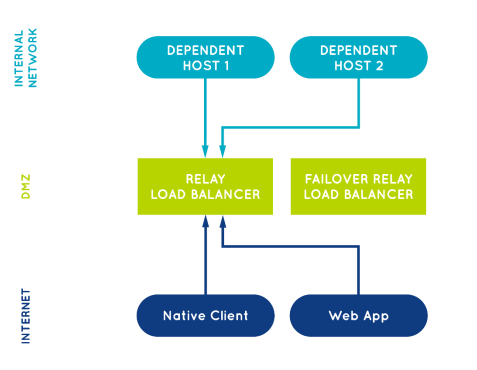
When a session starts on a Dependent Host, the Dependent Host opens a connection to the Relay Load Balancer. When the Relay Load Balancer receives data from the session’s clients, it forwards the data to the session over this connection. Similarly, when the Relay Load Balancer receives data from the session over this connection, it forwards the data to the session’s clients. The Relay Load Balancer generally has two network interfaces: one that is accessible from clients outside the DMZ, and one that is accessible from Dependent Hosts behind the firewall.
The diagram below illustrates the recommended configuration for providing access to hosts on an internal network. The arrows show the direction in which the connections are made. Hosts connect to the Relay Load Balancer, not the other way around. As a result, the internal firewall does not need to allow any connections from the DMZ to the internal network. With this configuration, neither machines on the internet nor machines in the DMZ can connect directly to the hosts on the internal network. It is a highly secure configuration.
Conclusion
By properly configuring the Relay Load Balancer and its Dependent Hosts, administrators can ensure seamless, secure access to GO-Global applications across complex network environments. Centralized management simplifies updates and synchronization, while intelligent session distribution maximizes performance and resource efficiency. When deployed in a DMZ, the Relay Load Balancer enhances security by isolating internal hosts from external access—delivering a flexible and protected solution for enterprise-scale remote application delivery.
Are you an ISV exploring cloud-based application delivery? Contact us to learn how GO-Global can help you streamline software access for your end users. Or download a free trial to test it yourself.


